Chapter 1
The short answer: review the carousel as a sequence
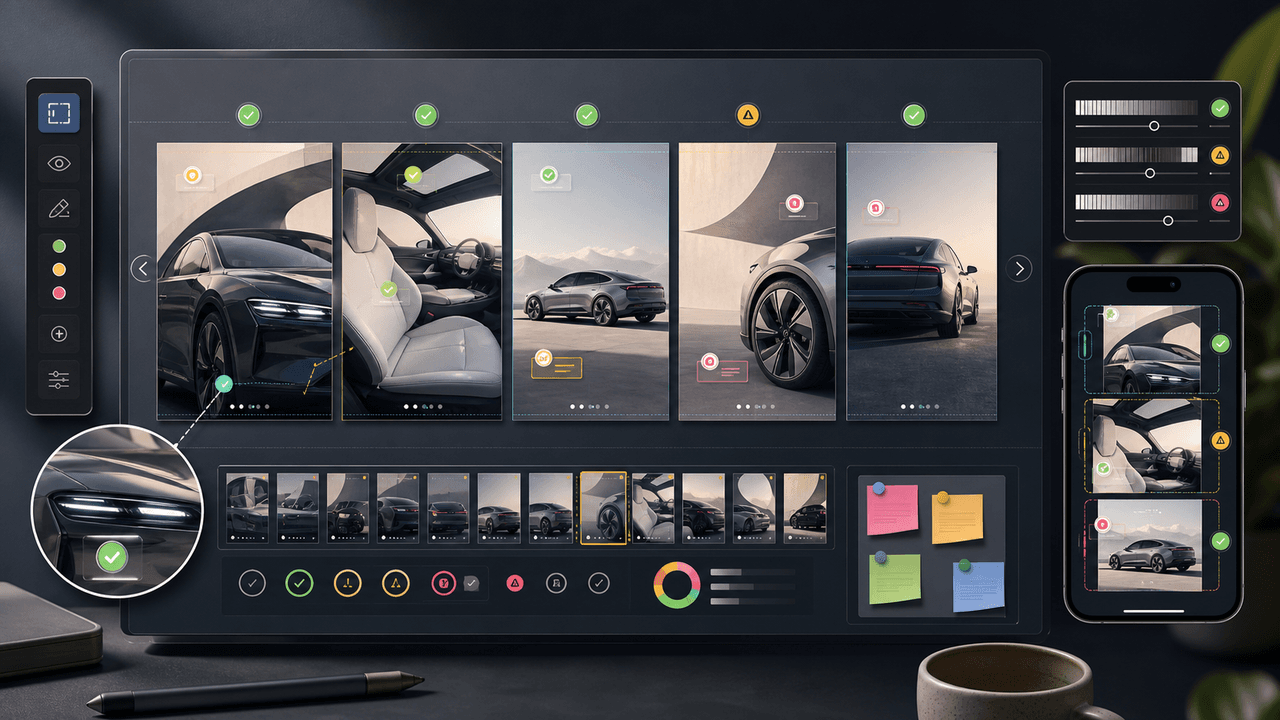
A visual QA checklist for AI-generated carousels should review the full sequence, not just individual slides. Check the hook, slide order, visual continuity, mobile readability, factual claims, source support, product or character accuracy, accessibility, platform format, and CTA destination before scheduling.
Carousels fail when they look good one slide at a time but break as a story. The hook promises one thing, the middle slides drift, the product changes, the infographic uses unsupported data, or the CTA sends people to a page that does not match the post.
The right QA process is fast but strict. A reviewer should be able to approve, reject, or request edits with reason codes. Those reason codes then improve the next generation batch.
Check sequence logic from slide 1 to final CTA.
Check visual continuity across all cards.
Check every product, character, app screen, number, and claim.
Check readability on mobile, not only desktop preview.
Check that the CTA and landing page match the promise.
Chapter 2
First, check the sequence logic
A carousel is a sequence. The first QA pass should ask whether the post has a clear path: hook, context, explanation, proof, action. If the slides can be rearranged without changing meaning, the sequence is probably too loose.
For educational carousels, each slide should answer the next reader question. For product carousels, the sequence should move from need to product fit to proof to next step. For infographic carousels, the sequence should move from question to framework to source-backed conclusion.
This is where AI-generated drafts often need human editing. The model may produce plausible slides that repeat the same point instead of building an argument.
- 1
Slide 1: hook
Does the first slide name a specific problem, promise, question, or outcome?
- 2
Slides 2-4: context
Do the early slides explain why the reader should care without overloading them?
- 3
Middle slides: value
Does each slide add a new example, step, comparison, detail, or proof point?
- 4
Final slides: action
Does the sequence land on a clear next step that matches the post's intent?
Chapter 3
Check visual continuity across all slides
Visual continuity is what makes a carousel feel intentional. AI-generated slides may drift in font weight, color temperature, background style, product scale, character face, icon style, diagram style, or image realism. These changes distract the reader and weaken trust.
Lay the slides out in a grid. The full set should look like one post from one brand. Small variations are fine when they support the story, but random changes are not.
The most common drift problems are subtle: one slide has a different shade of the brand color, one product image is larger, one character's hair changes, one diagram uses a different icon style, or one background looks like a different room.
Same type system and hierarchy.
Same color roles and contrast behavior.
Same margin and text-safe area.
Same product or character identity.
Same illustration, icon, or photo style.
Intentional slide-to-slide variation only where it improves meaning.
Chapter 4
Check readability on the smallest expected screen
Readability QA should happen on a phone-sized preview. Desktop review hides problems. Tiny labels, low contrast, crowded diagrams, and long text blocks can all look acceptable on a large monitor and fail on mobile.
Use accessibility guidance as a practical floor. W3C's contrast guidance gives teams a concrete threshold for text contrast, but social readability also depends on type size, line length, slide density, and background complexity.
If a slide cannot be understood in two seconds, reduce it. Split the idea across slides, simplify the diagram, increase text size, or move source context to the caption or linked article.
Headline readable at phone size.
Body text short enough for a quick swipe.
Strong text contrast.
No important text over busy image areas.
One focal point per slide.
Caption or alt text covers important visual context.
Chapter 5
Check claims and sources before design approval
A carousel that teaches, compares, or persuades is making claims. AI can generate claims that sound familiar but are not supported. The QA checklist should require source review before design approval, especially for statistics, platform rules, product performance, health, finance, safety, or legal-adjacent content.
Google's AI-generated content guidance focuses on helpful, reliable results. That reliability standard applies to carousels too. The fact that the asset is social content does not lower the burden when the slide gives advice or presents data.
Use a claim sheet. Each factual slide should have a source note or owned-data note. If a claim cannot be sourced, rewrite it as an opinion, remove it, or link to a more complete explanation.
- 1
Identify claim slides
Mark slides with numbers, comparisons, platform rules, product claims, or how-to instructions.
- 2
Attach sources
Use official docs, product documentation, owned analytics, standards, or credible research.
- 3
Check wording strength
Do not turn a qualified source into an absolute claim. Keep scope and context.
- 4
Place citations appropriately
Use slide footnotes, caption sources, linked blog articles, or internal review notes depending on the format.
Chapter 6
Check product, app, and character accuracy
If the carousel shows a product, app, dashboard, AI influencer, or brand character, QA must compare the visual against the source of truth. A product should match the SKU. An app screen should match the current interface. A character should match the character bible. A chart should match the data.
This is especially important for AI-generated carousel sets because a model may keep the general idea while changing details across slides. A product label shifts. A dashboard gains a fake metric. An influencer face changes. A diagram adds a step that does not exist.
Accuracy review should happen before captions and scheduling because visual errors often require regeneration or compositing, not minor copy edits.
Product matches reference and variant.
App screen or workflow is real.
Character face, style, age range, and voice match the bible.
Charts and diagrams match the source sheet.
No fake testimonials, badges, metrics, or UI controls appear.
Chapter 7
Check platform fit and export requirements
A carousel that works for Instagram may not work for LinkedIn or TikTok. Platform specs influence card count, ratio, file type, headline area, and visual density. Before export, confirm the post is formatted for the channel where it will run.
Meta, TikTok, and LinkedIn all document carousel or swipeable ad formats. Even if the post is organic, these specs are useful production constraints because teams often reuse organic creative in paid or sponsored contexts.
The QA pass should also check safe zones. Platform UI, captions, and profile overlays can hide important text or product details if the design puts everything at the edge.
Correct aspect ratio and card count.
Text-safe areas are respected.
Product or CTA is not hidden by UI overlays.
First card is strong enough to earn the swipe.
File names and campaign names are trackable.
Chapter 8
Check CTA and destination match
The final QA check is whether the carousel sends the reader to the right next step. A product education carousel should link to the product, collection, or guide it discusses. A generated infographic should link to the full explanation or relevant workflow. A brand-style checklist should link to the system or template promised.
CTA mismatch wastes attention. It also creates trust friction. If the carousel promises a comparison and the landing page is a generic homepage, the reader has to restart the search themselves.
AttentionClaw helps teams produce these assets faster, but the same rule applies: every generated carousel should have a specific conversion job and a destination that fulfills the promise.
- 1
Name the next step
Download, shop, compare, learn, try, book, subscribe, or read more.
- 2
Check destination content
The linked page should contain the product, offer, explanation, or workflow the carousel promised.
- 3
Check CTA wording
The final slide and caption should use the same action language.
- 4
Check measurement
Use campaign naming or UTM parameters when the post is part of a measurable campaign.
Callout
Generate carousels and review them before publishing
Use AttentionClaw to generate carousel batches from approved rules, then run the same QA checklist before scheduling the assets.
Next step
Generate faster without skipping carousel QA
AttentionClaw helps teams create consistent carousel batches from approved rules, then review them before publishing.
Common Questions
FAQ
More Reading
Keep reading
7-chapter read
How to Debug AI Style Drift in Social Images
AI style drift happens when generated social images slowly stop matching the approved brand, product, character, or scene system. Debug it by isolating the drift type, comparing against baselines, tightening prompt blocks, adding references, and changing the review gate.
7-chapter read
Visual Regression Review for AI Social Campaigns
Visual regression review catches AI campaign drift before publication by comparing new assets against approved baselines for brand style, product truth, character identity, typography, claims, and platform format.
AI-Generated Product Infographic Checklist
AI-generated product infographics should start with product truth and source-backed claims. Use a checklist for SKU accuracy, variant logic, evidence, chart integrity, readability, citations, and destination-page match before publishing.
9-chapter read
Source Citation Checklist for AI-Assisted Social Content
AI-assisted social content needs a source checklist whenever it makes factual, product, performance, legal, health, financial, environmental, platform, or customer-proof claims. The checklist should define claim risk, acceptable sources, citation notes, reviewer status, and rewrite rules before content is scheduled.
8-chapter read
Brand Safety Checklist for AI Social Images: 6 Gates
AI-generated social images should not go live because they look polished. They need a brand-safety review that checks product fidelity, claim accuracy, platform policy, accessibility, disclosure, and landing-page match before publication.
AI Image Consistency Checklist for Instagram Carousels
AI image consistency for Instagram carousels requires checks before, during, and after generation: identity lock, style lane, product accuracy, character continuity, camera rules, crop safety, text safety, disclosure, and final mobile review.
10-chapter read
TikTok Slideshow Quality Checklist Before You Publish
A TikTok slideshow quality checklist should review the hook, slide sequence, mobile readability, product or screenshot accuracy, claim support, disclosure needs, CTA match, destination link, and campaign tracking before publishing. The checklist protects quality when teams are producing fast.
9-chapter read
Client Content Intake Checklist for Carousels and TikTok Slideshows
A strong client content intake checklist prevents generic AI posts, unsupported claims, visual drift, and approval delays. Agencies should collect the offer, audience, proof, assets, product facts, forbidden claims, platform priorities, destination links, approval owners, and measurement rules before production starts.
How to Keep Product Photos Consistent Across AI-Generated Social Posts
Consistent AI product images come from a system, not a lucky prompt. Lock the product reference, camera rules, lighting, background family, brand palette, allowed variations, and review checklist before generating campaign assets. Then vary context and message without changing the product identity.
Sources
- Google Search's guidance about AI-generated content — Google Search Central
- Understanding Success Criterion 1.4.3: Contrast (Minimum) — W3C Web Accessibility Initiative
- Awareness Carousel Ad Specs on Facebook Feed — Meta Ads Guide
- Carousel Ads Specifications — LinkedIn Help
Written by
AttentionClaw
Editorial Team
Editorial context
Part of the Carousel Creation topic cluster. Last updated June 22, 2026.