Chapter 1
The newsletter is the argument, not the final format
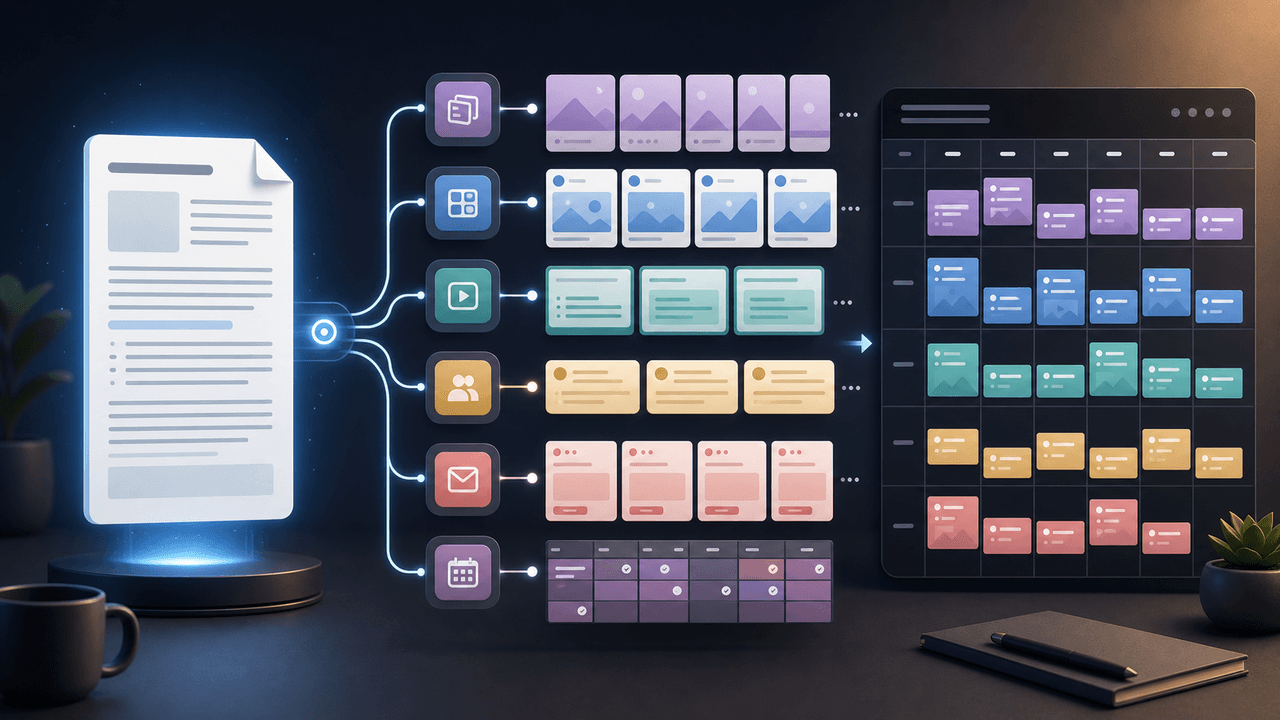
Most newsletter repurposing fails because the creator treats the email as text to redistribute. That produces long captions, crowded slides, and social posts that feel like leftovers. A better workflow treats the newsletter as the source argument. The job is to identify the pieces of that argument and give each one a native social format.
Mailchimp's newsletter writing guidance starts with basic building blocks such as sender identity, subject line, preview text, body, and call to action. That matters for repurposing because an email is already a sequence of promises, proof, and action. Instead of copying the whole sequence, pull apart those elements and rebuild them for a swipe, scroll, or tap environment.
Use this rule: if a reader would save it, make it a carousel or document. If a reader would debate it, make it a text post. If a reader would ask a follow-up question, make it a YouTube or community post prompt. If a reader needs to act now, make it a CTA asset with campaign tracking.
Main claim becomes the hook asset.
Framework or numbered process becomes the carousel.
Evidence and examples become supporting slides or a LinkedIn document.
Reader objection becomes a standalone post.
CTA becomes a tracked link, not an afterthought.
Chapter 2
Extract five source pieces before writing any posts
One newsletter can produce many assets only if you separate the idea before you resize it.
- 1
The thesis
Write the newsletter's core point in one sentence. Example: 'Creators do not need more content ideas; they need a better extraction system for work they already do.' This becomes the backbone for the social series.
- 2
The reader problem
Identify the pain the newsletter solved. Is the reader short on ideas, struggling to explain expertise, unable to keep up with posting, or unsure how to measure content? That problem determines the first-slide hook.
- 3
The proof
Pull every factual claim, example, customer quote, survey result, or process observation that supports the argument. Google's people-first content guidance is useful here: proof should help the reader trust the answer, not decorate a thin post.
- 4
The method
Find the repeatable steps, checklist, or decision rule. This is usually the highest-value social asset because it gives the audience something they can save and reuse.
- 5
The next action
Decide what the reader should do after consuming the repurposed asset: read the full issue, join the list, download a template, book a call, or try the workflow in AttentionClaw.
Chapter 3
The seven-asset plan for one newsletter
A 900-word newsletter normally has enough substance for seven assets without becoming repetitive. The trick is to change the job of each asset. Do not make seven summaries. Make one summary, one framework, one objection handler, one example, one quote asset, one community question, and one conversion asset.
Meta's carousel specifications allow multiple cards in a single unit, and each card in carousel ads can carry its own creative and destination fields. Even when you are making organic content, this is a useful mental model: every slide should earn its place, and each card can move the reader through a slightly different part of the argument.
For expert newsletters, the strongest first batch is usually a carousel that teaches the framework, a LinkedIn document that expands the argument, a short video script that dramatizes the mistake, a YouTube post that asks the audience which part they struggle with, a quote graphic, a follow-up email, and one CTA post that points to the deeper resource.
Asset 1: carousel framework from the main method.
Asset 2: LinkedIn document for the full argument and proof.
Asset 3: short script from the strongest example.
Asset 4: YouTube post or community question from the reader objection.
Asset 5: quote graphic from the sharpest line.
Asset 6: follow-up newsletter answering a comment or reply.
Asset 7: tracked CTA post for the template, offer, or product workflow.
Chapter 4
Build the carousel around the method, not the whole issue
The carousel should not summarize the newsletter. It should teach the most reusable part of the newsletter. If the issue argues that course creators should stop publishing random tips and start extracting lesson moments, the carousel should show the extraction method, not recap every paragraph.
Use an 8-slide structure: problem, promise, step one, step two, step three, example, mistake to avoid, CTA. This keeps the asset useful without forcing the entire newsletter onto the slides. It also gives the reader enough value to save the post even if they never click through.
Accessibility matters because social slides are often text images. Use high contrast, readable type sizes, short line lengths, and uncluttered layouts. WCAG's contrast guidance is a practical floor for slide legibility, especially when carousels are viewed on mobile screens in bright environments.
Callout
Carousel test
If the carousel cannot be understood from screenshots alone, it is too dependent on the original newsletter. Add context, simplify the sequence, or choose a narrower slice of the issue.
Chapter 5
Use a LinkedIn document when the newsletter has a real argument
Some newsletters are too nuanced for a short carousel. A founder essay, educator breakdown, or expert-business teardown may need more room for charts, examples, and caveats. In that case, convert the issue into a LinkedIn-style document instead of trying to compress everything into a caption.
LinkedIn describes Document Ads as documents readers can view and download directly in feed. The paid product is not the point here; the format reveals why documents work for expert content. They let the reader spend more time with an argument without leaving the feed immediately.
Turn the newsletter into a 10-14 page document with one idea per page: claim, context, mistake, framework, example, evidence, action checklist, and CTA. Keep the title specific. 'My 2026 creator content system' is weaker than 'How one newsletter becomes seven expert assets without sounding repetitive.'
- 1
Open with the outcome
Do not start with background. Start with what the reader will be able to do after reading the document.
- 2
Use examples as section breaks
Every three or four pages, show a concrete transformation: newsletter paragraph to carousel slide, reader reply to post idea, or CTA to tracked campaign link.
- 3
End with a production checklist
A document should leave the reader with a reusable process, not just agreement. Add a checklist they can apply to the next issue.
Chapter 6
Turn replies and objections into community posts and short scripts
Newsletter replies are not only feedback. They are search data from your own audience. If three readers ask whether the workflow applies to a podcast, a course lesson, or a coaching call, that is your next content cluster.
YouTube posts can include text, polls, quizzes, images, and video according to YouTube Help. That makes them useful for testing the questions buried in a newsletter before you make a full video. A poll like 'Which part of repurposing takes longest: extraction, writing, design, or publishing?' gives you both engagement and product-language research.
Use short scripts for the most emotional part of the newsletter: the mistake, the before/after, or the contrarian claim. Do not script the whole issue. Script the moment that would make someone stop scrolling and think, 'That is exactly what I do wrong.'
Chapter 7
Track the repurposing series as one campaign
A newsletter repurposing series should not be measured as disconnected posts. It is one campaign with multiple entry points. Use a consistent campaign name, clear source labels, and separate content labels for the carousel, document, post, and CTA asset.
Google Analytics campaign URL guidance explains that UTM parameters help identify which campaigns refer traffic. For this workflow, that means your newsletter link, LinkedIn document CTA, carousel bio link, and YouTube post link should not all look identical in reporting.
The simplest naming system is source equals platform, medium equals format, campaign equals the newsletter issue, and content equals the asset angle. Example: source=linkedin, medium=document, campaign=newsletter_repurposing_system, content=framework_checklist.
Measure saves and shares for framework assets.
Measure replies and comments for objection assets.
Measure click-throughs for CTA assets.
Measure subscriber growth when the social asset points back to the newsletter.
Review the series as a whole before judging any one asset.
Chapter 8
Where AttentionClaw fits
AttentionClaw is useful after the idea extraction is done. The product should not decide what your newsletter means. You decide the thesis, audience, proof, and CTA. Then AttentionClaw can turn that structured input into branded carousel, slideshow, and visual post drafts faster than rebuilding every asset by hand.
For creators, coaches, and expert businesses, the leverage is consistency. A newsletter habit already proves you can think in public. A repurposing system turns that thinking into a repeatable social production workflow without forcing you to start from a blank page every day.
Callout
Turn one newsletter into a structured social series
Use AttentionClaw when you have a newsletter issue with a clear argument and need the social versions drafted, structured, and visually consistent in one production session.
Next step
Turn one newsletter into a complete social series
Use AttentionClaw to convert structured source ideas into branded carousels, slideshows, and social drafts without rebuilding every asset manually.
Common Questions
FAQ
More Reading
Keep reading
10-chapter read
How to Turn an Email Sequence Into Social Content
An email sequence becomes social content when each email's job is mapped to a native asset: problem, belief shift, proof, objection, tutorial, and CTA.
10-chapter read
How to Turn a Lead Magnet Into a Full Social Content System
A lead magnet becomes a social content system when you separate the promise, framework, preview value, objections, proof, and conversion CTA instead of only posting download reminders.

How to Turn One Good Idea Into 7 Different Instagram Carousels
You do not need 30 unique ideas to post every day. You need one strong idea and a system that turns it into 7 carousels with different angles, formats, and depths.

A 30-Day Calendar That Includes the Work Around Each Post
A useful monthly Instagram calendar records more than publication dates. It connects audience questions, approved sources, content pillars, owners, review gates, destinations, live URLs, listening notes, and correction decisions. The complete 30-day example below includes production and hold days so it can be adapted without implying that every account should post daily.

Choose Content Pillars Your Team Can Actually Support
An Instagram content pillar is a durable editorial promise to a defined audience, supported by evidence your team can keep producing. It is not a mandatory posting ratio, a list of formats, or an SEO topic cluster. Use the worksheet in this guide to decide which themes deserve recurring coverage and which should remain occasional.
10-chapter read
How to Turn Podcast Show Notes Into Social Posts
Podcast show notes are a structured source for social content when you separate the episode promise, guest authority, timestamps, resources, questions, and CTA.
10-chapter read
How to Turn One Blog Post Into a Full Social Content System
A strong blog post can become a full social content system when you extract the direct answer, framework, examples, sources, objections, and CTA separately instead of summarizing the whole article.
10-chapter read
How to Turn a Newsletter Archive Into a Content Hub
A newsletter archive becomes a content hub when you cluster old issues by search intent, update the strongest pieces, add sources, build internal links, and convert each cluster into social assets.

Podcast Interview Content Repurposing System: One Guest Conversation Into a Week of Assets
A podcast interview should become more than audiograms. Extract the guest thesis, strongest story, quotable lines, objection answers, listener questions, and resource CTA into a week of native assets.

From YouTube Transcript to a Reviewable Carousel Brief
Repurposing a YouTube video into an Instagram carousel is an editorial adaptation, not a transcript export. Work from video material you are authorized to reuse, preserve the source meaning, score candidate excerpts for fit, assign each slide a job, and complete a platform and rights review before publishing.
Sources
- Writing Email Newsletters — Mailchimp
- Creating Helpful, Reliable, People-First Content — Google Search Central
- Document Ads — LinkedIn Marketing Solutions
- URL Builders: Collect Campaign Data With Custom URLs — Google Analytics Help
- Understanding Success Criterion 1.4.3: Contrast (Minimum) — W3C Web Accessibility Initiative
Written by
AttentionClaw
Editorial Team
Editorial context
Part of the Repurposing topic cluster. Last updated June 22, 2026.