Chapter 1
A webinar recap is usually the weakest asset
The lowest-value webinar repurposing move is posting 'Here are five things we covered in the webinar.' That may remind attendees, but it rarely helps new prospects. Non-attendees do not care that the webinar happened. They care whether the idea solves a problem they recognize.
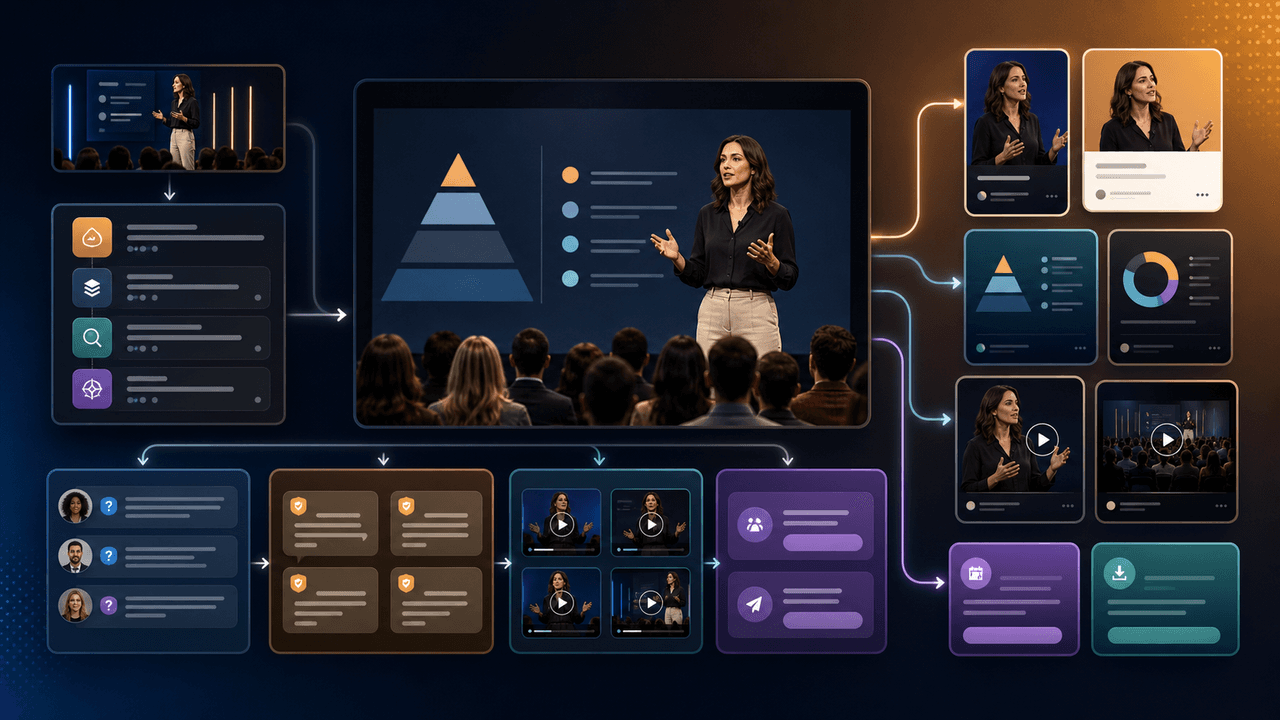
Expert businesses should treat the webinar as a source of proof. It contains the positioning promise, the teaching framework, live audience questions, objections in the chat, examples, stories, and the offer bridge. Those pieces deserve different assets because they answer different buying questions.
Google's people-first content guidance is a useful standard here. A repurposed webinar asset should satisfy a real question by itself. If the post only says 'watch the replay,' it is not content. If it teaches one piece, clarifies one misconception, or answers one objection, it can earn attention before asking for action.
Framework assets build authority.
Proof assets build belief.
Question assets reveal demand.
Objection assets reduce sales friction.
CTA assets move warm prospects to the next step.
Chapter 2
Run a six-lane extraction pass
Watch the replay once with timestamps and extract by asset lane, not by chronology.
- 1
Promise lane
Capture the core transformation promised by the webinar. This becomes the campaign message and the first social hook.
- 2
Framework lane
Extract the named model, steps, checklist, or decision tree. This becomes the saveable carousel or LinkedIn document.
- 3
Proof lane
Mark stories, examples, screenshots, before/after moments, or customer language. These become credibility assets.
- 4
Question lane
Collect every live question from chat and Q&A. The repeated questions become future posts because they reflect real market confusion.
- 5
Objection lane
Separate objections from questions. 'Will this work for my niche?' and 'I do not have time' need different content from basic how-to questions.
- 6
Offer lane
Capture the exact bridge between the free teaching and the paid next step. This is where most repurposing gets vague; keep it specific.
Chapter 3
The post-webinar sequence
The strongest webinar content sequence runs for one to two weeks after the event. It should not dump every asset at once. The order matters because the audience includes attendees, no-shows, replay viewers, and people encountering the topic for the first time.
Start with the framework carousel while the event is fresh. Follow with a proof post that shows the idea in context. Then publish an objection post that addresses the most common hesitation. After that, use a LinkedIn document or long-form post to expand the argument for higher-intent readers. End with a CTA asset that points to the replay, consultation, waitlist, or product workflow.
This sequence works because it mirrors the buyer's mental path: understand the idea, believe it is relevant, resolve the objection, evaluate the deeper argument, and choose the next step.
Day 1: framework carousel.
Day 2: thank-you or replay email for attendees and no-shows.
Day 3: proof post with one concrete example.
Day 5: objection-handling post.
Day 7: LinkedIn document or long-form breakdown.
Day 10: tracked CTA asset.
Chapter 4
Turn the teaching framework into a carousel
The framework is usually the most saveable part of a webinar. It is also the easiest to ruin by over-compressing. Do not try to fit a 45-minute teaching section into eight slides. Fit the decision path into eight slides.
Use this structure: problem, promise, framework overview, step one, step two, step three, example, next step. If the webinar has more than three steps, split it into multiple assets. One clear carousel beats one crowded carousel with tiny text.
Meta's carousel specifications describe a format made from multiple cards, each with its own creative. Use that discipline even for organic expert content. Each slide should do one job: name the issue, explain the rule, show the example, or point to action.
Callout
Framework test
A prospect should be able to describe the framework after swiping the carousel. If they can only say 'there was a webinar,' the asset is too vague.
Chapter 5
Use a document for nuance and proof
Expert webinars often contain nuance that short carousels cannot hold: market context, tradeoffs, proof, assumptions, and implementation notes. That material fits better as a LinkedIn-style document or downloadable PDF.
LinkedIn's Document Ads guidance explains that documents can be consumed in feed and may be shared freely or gated with a lead form in the ad context. Organic teams can borrow the same pattern: publish a document that stands alone, then use the CTA to route high-intent readers to the replay or next step.
A strong webinar document does not need to be a transcript. It should be a redesigned executive brief: the problem, the cost of ignoring it, the framework, the example, the objection, the checklist, and the next action.
- 1
Remove event housekeeping
Delete intros, speaker bios, agenda slides, and admin notes unless they add credibility to the argument.
- 2
Add source-backed context
Where the webinar uses industry claims, cite the credible source in the document or notes. Do not rely on memory from the live presentation.
- 3
End with a decision checklist
Give readers a way to decide whether the deeper offer or workflow is relevant to them.
Chapter 6
Turn Q&A into the highest-intent content
The Q&A is often more commercially valuable than the prepared slides. Prepared slides show what the expert wanted to teach. Questions show what the market still does not understand. Objections show why prospects hesitate.
Separate informational questions from buying objections. 'What tool should I use?' is informational. 'Will this work if I only have two hours per week?' is an objection. Informational questions become educational posts. Objections become trust-building posts that explain constraints, fit, and tradeoffs.
YouTube posts can include polls, quizzes, text, images, and video according to YouTube Help. That makes them a useful low-friction place to test which Q&A topics deserve a deeper video or next webinar.
Repeat questions become FAQ content.
Confused questions become beginner explainers.
Skeptical questions become objection posts.
Tactical questions become checklist assets.
Unexpected questions become future webinar topics.
Chapter 7
Measure replay, pipeline, and content value separately
Webinar repurposing has three measurement jobs. First, did the content drive replay consumption? Second, did it move qualified prospects toward a product, call, or list? Third, which extracted assets created durable social engagement?
Use campaign URL parameters for every CTA link. Google Analytics guidance explains that UTM parameters identify referral campaigns in traffic reports. For webinar repurposing, use consistent campaign names and separate content tags for framework_carousel, proof_post, objection_post, and replay_cta.
Do not judge the sequence only by immediate sales. A proof post may produce saves and shares, while an objection post may produce DMs, and a CTA post may produce calls. The full sequence is doing more than one job.
Chapter 8
Where AttentionClaw fits
AttentionClaw helps after the extraction pass. The expert or marketer should decide which promise, framework, proof moment, and objection matter. Then AttentionClaw can turn those inputs into visual drafts for carousels, slideshows, and post sequences.
For coaches, consultants, and expert businesses, the benefit is speed with control. You keep the strategic judgment and source accuracy. The product helps multiply the webinar into native assets without making every post a generic recap.
Callout
Repurpose your webinar into a full content sequence
Use AttentionClaw to turn webinars and workshops into structured social sequences that teach, prove, answer objections, and point prospects to the next step.
Next step
Turn one webinar into a full trust-building sequence
AttentionClaw helps expert businesses convert webinar frameworks, proof, Q&A, and objections into branded social content drafts.
Common Questions
FAQ
More Reading
Keep reading
10-chapter read
How to Repurpose an Expert Roundtable Into High-Trust Social Content
An expert roundtable becomes strong social content when you separate consensus, disagreement, frameworks, proof, unanswered questions, and next-step CTAs.
10-chapter read
How to Turn an Email Sequence Into Social Content
An email sequence becomes social content when each email's job is mapped to a native asset: problem, belief shift, proof, objection, tutorial, and CTA.

How to Turn One Good Idea Into 7 Different Instagram Carousels
You do not need 30 unique ideas to post every day. You need one strong idea and a system that turns it into 7 carousels with different angles, formats, and depths.
10-chapter read
How to Turn Podcast Show Notes Into Social Posts
Podcast show notes are a structured source for social content when you separate the episode promise, guest authority, timestamps, resources, questions, and CTA.
10-chapter read
How to Turn Any Transcript Into Short-Form Content
A transcript becomes useful short-form content when you extract claims, stories, frameworks, questions, objections, and action steps instead of pasting spoken paragraphs into social formats.
10-chapter read
How to Turn a Case Study Into Social Content That Teaches
A case study becomes social content when you separate the starting problem, constraints, intervention, proof, lesson, caveat, and next step into assets that teach rather than merely celebrate the result.
10-chapter read
How to Turn One Blog Post Into a Full Social Content System
A strong blog post can become a full social content system when you extract the direct answer, framework, examples, sources, objections, and CTA separately instead of summarizing the whole article.
10-chapter read
How to Turn Expert Interviews Into LinkedIn Newsletters
An expert interview becomes a strong LinkedIn newsletter when you turn it into an editorial brief: thesis, context, expert framework, evidence, practical takeaway, and next-step CTA.

SaaS Content Repurposing: Turn Docs, Blogs, and Changelogs Into Carousels
SaaS companies sit on mountains of existing content — docs, blogs, changelogs, support articles — that could become dozens of carousels. The problem is not a lack of ideas. It is the lack of a system to extract and reformat that content efficiently.

Turn coach-owned source material into useful carousel briefs
A practical workflow for turning coach-owned long-form material into standalone carousel briefs without inventing a guaranteed output count or exposing client information.
Sources
- Creating Helpful, Reliable, People-First Content — Google Search Central
- Design Specifications for Carousel Ads — Meta Business Help Center
- Document Ads — LinkedIn Marketing Solutions
- Learn About Posts — YouTube Help
- URL Builders: Collect Campaign Data With Custom URLs — Google Analytics Help
Written by
AttentionClaw
Editorial Team
Editorial context
Part of the Repurposing topic cluster. Last updated June 22, 2026.